
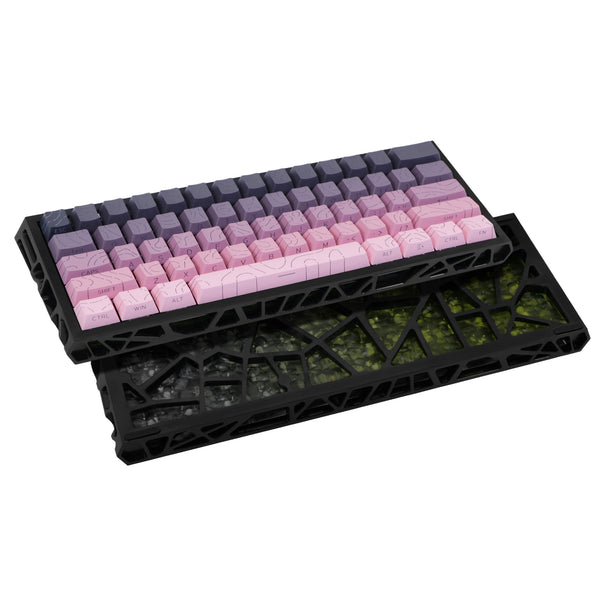

A magnetic switch keyboard registers each key press with a magnet and a sensor instead of two parts that touch. The sensor is a Hall effect sensor, a part that turns a magnetic field into an electrical signal. This guide explains how that works, what adjustable actuation means, and how a magnetic board compares with a classic mechanical one. It uses two compact boards from the store as examples, with only the specs their listings print.
What is a magnetic switch keyboard?
Hall effect sensors convert magnetically encoded information into electrical signals. They are named after Edwin Hall, who discovered the effect in 1879, according to the American Physical Society as cited by Aim Dynamics. Outside keyboards, they show up in car anti-lock braking systems, printers that detect an open cover, and phones that sense a closed flip cover.
A Hall effect sensor can tell when an object moves closer or further away, just from the changing strength of a magnetic field. RS gives the example of a sensor in a door frame and a magnet on the door. A magnetic switch keyboard applies the same idea to each key: the key moves a magnet, and the sensor reads the field. The [NC61 magnetic switch keyboard](https://www.9spacex.com/products/nc61-magnetic-switch-mechanical-keyboard-single-mode) is one example, and its listing states that each key uses a magnetic switch.
How a Hall effect sensor reads a key press
Inside the sensor, a continuous current runs through a thin piece of semiconductor. When a magnetic field acts on it, the charge carriers are pushed to one side. That creates a small voltage across the material, called the Hall voltage. The voltage is very small, only a few microvolts, so most sensors include built-in amplifiers and other circuits to make them more sensitive.
Hall effect sensors come in two broad types. Linear, or analog, sensors give a continuous output that rises with a stronger field and falls with a weaker one. Digital sensors add a Schmitt trigger, which compares the signal with preset thresholds and switches between off and on. Electronics Tutorials notes that this switching happens without any type of contact bounce.
When a magnet approaches a sensor straight on, the field gets stronger as it gets closer, and a linear sensor gives a greater output. That is the core of a magnetic key: the deeper the key travels, the closer the magnet, and the stronger the signal the sensor reads.
What adjustable actuation means
The actuation point is how far you press a key before the keyboard counts it as a press. Because a linear Hall effect sensor reports field strength as a function of distance, the press can be judged against a threshold rather than a fixed contact. CircuitBread describes how a Schmitt trigger compares the amplifier output with preset threshold values to decide between a logic high and a logic low. Adjustable actuation is the idea of letting that threshold move, so a key can register earlier or later in its travel.
The NC61 listing describes its magnetic switches as adjustable and hot-swappable. It does not say how the adjustment is made, what range it covers, or whether rapid trigger is supported. Rapid trigger is a feature some magnetic keyboards advertise, so if it matters to you, confirm it on the product page before you count on it.
Magnetic vs mechanical switches
A classic switch registers a press through physical contact. Hall effect sensors are non-contact sensors, and CircuitBread calls that a major advantage over physical contact sensors such as limit switches. TDK-Micronas notes that Hall switches are increasingly replacing conventional microswitches, for example in seat belt buckles or blinds.
The sources list several strengths of Hall effect sensors. Because they make no physical contact with what they measure, TDK-Micronas says they experience virtually no wear. CircuitBread calls them maintenance-free, and Electronics Tutorials says sealed devices are immune to vibration, dust and water. Keep in mind that these sources describe industrial and automotive sensors, not keyboards, and the store has no keyboard test data on wear.
The sources also list limits. Hall effect sensors need external power to operate, and external magnetic fields can influence them. TDK-Micronas explains that they work at very low signal voltages, which makes them prone to offset drifts from temperature, voltage fluctuations and mechanical stress, so good designs compensate for this.
For a classic option, the [KL61 mechanical keyboard with red switches](https://www.9spacex.com/products/kl61-single-mode-mechanical-keyboard) uses red mechanical switches in both its black and white versions. Its listing gives a weight of 520 g and says the box contains the keyboard. Nothing in the listing describes the switches as adjustable, so treat its actuation as fixed by the switch.
Are Hall effect switches better than mechanical switches?
Neither type is better for everyone. The sources show that non-contact sensing avoids wear from touching parts, while also needing power and careful design. What matters more for a desk is whether you want to tune how keys respond.
- A magnetic board such as the NC61 may suit you if you want switches listed as adjustable and hot-swappable.
- A classic board such as the KL61 may suit you if you do not need adjustable actuation and want red mechanical switches.
- Either may suit you if you want a compact board that frees up desk space, since both listings describe that goal.
Is a compact layout big enough for work?
The NC61 uses a 60% layout with 61 keys. Its listing says the small layout keeps the board compact, so the mouse and notes get more of the desk. A compact board has fewer keys than a full-size keyboard, and the listing does not detail which keys are left out or how their functions are reached.
If you type text, email and code, a compact board can work well once you learn where the missing functions sit. If you lean on a number pad or dedicated navigation keys all day, a larger layout may suit you better. For a side-by-side look at in-between sizes, read our [guide to keyboard layouts for a small desk](https://www.9spacex.com/blogs/news/75-percent-vs-tkl-keyboard-for-a-small-desk), or browse [all keyboards in the store](https://www.9spacex.com/collections/keyboards).
Other details to check before you choose
- Connection: both the NC61 and the KL61 work in a single connection mode. The NC61 listing says its exact connection type is not confirmed yet.
- Lighting: the NC61 has an RGB backlight under translucent PBT keycaps, in a hollow skeleton case.
- Colors: the NC61 lists Black and Pink, Blue, and White and Pink. The KL61 comes in black or white.
- Unlisted details: the NC61 listing says box contents, dimensions and weight are not yet confirmed.